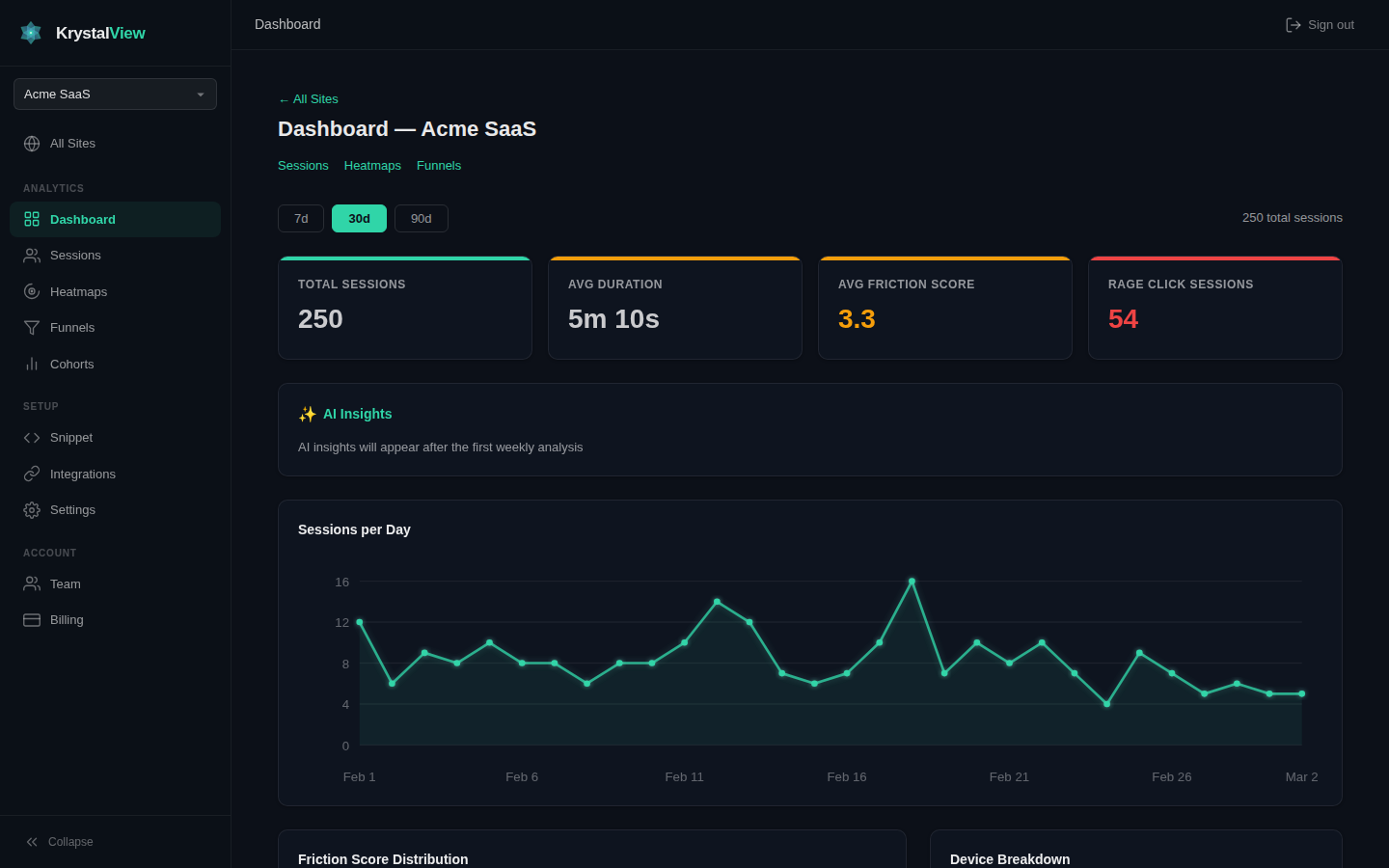
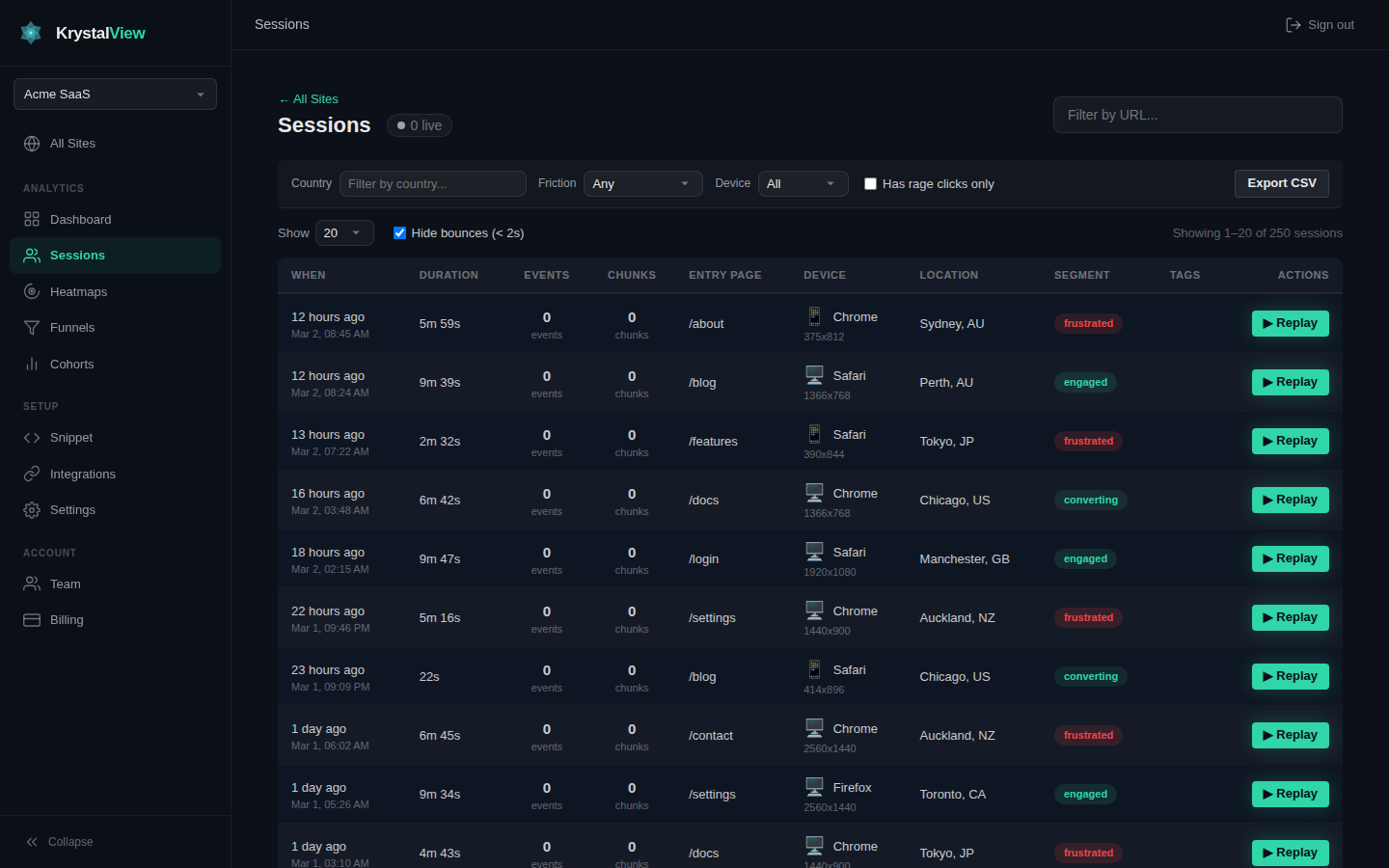
Your AI tools are only as useful as the context they can reach. KrystalView turns every click, scroll, rage-click, campaign, error, funnel, and replay into structured visitor evidence — queryable from Claude, Cursor, Windsurf, Slack workflows, or your own LLM through our native Model Context Protocol server.
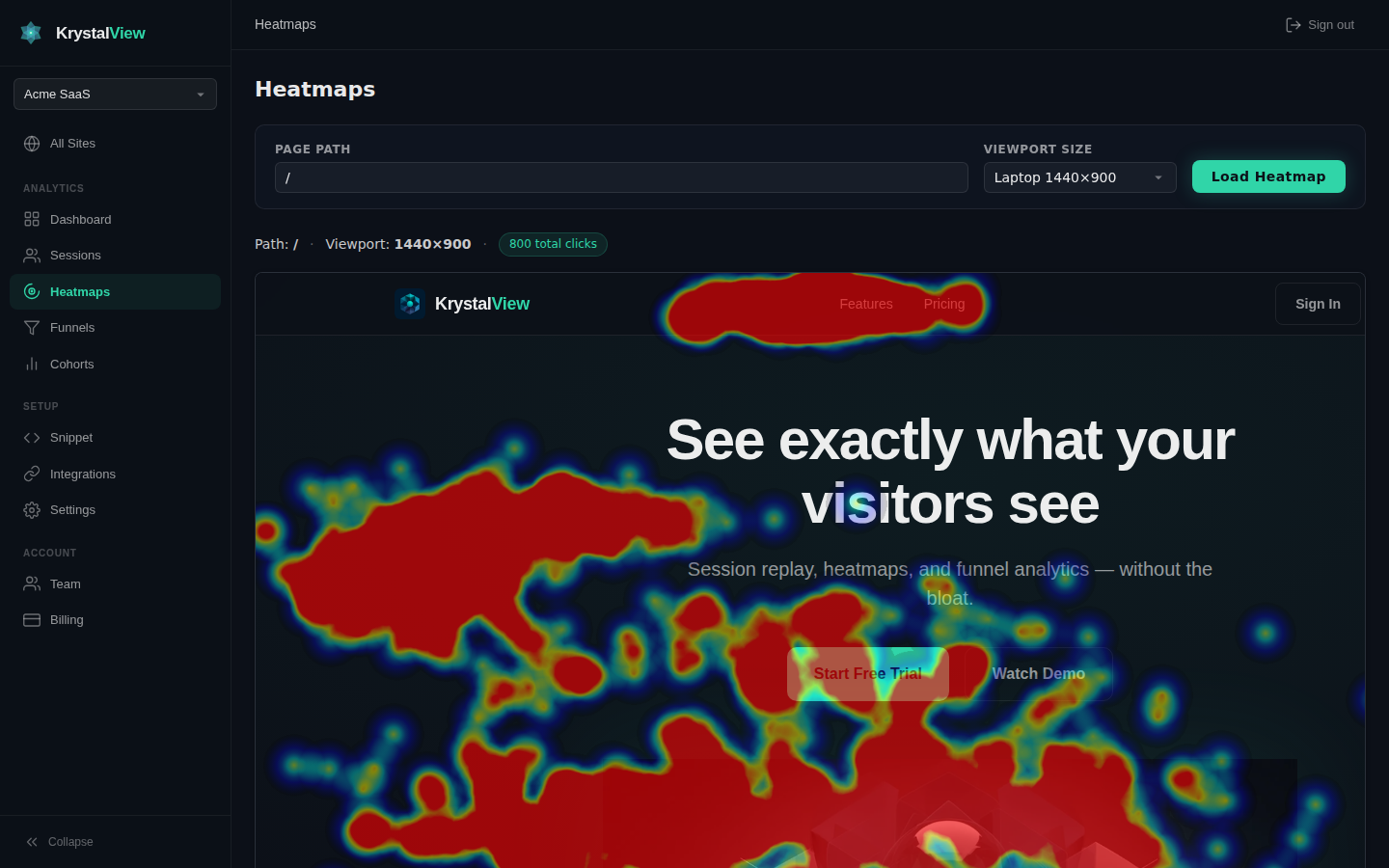
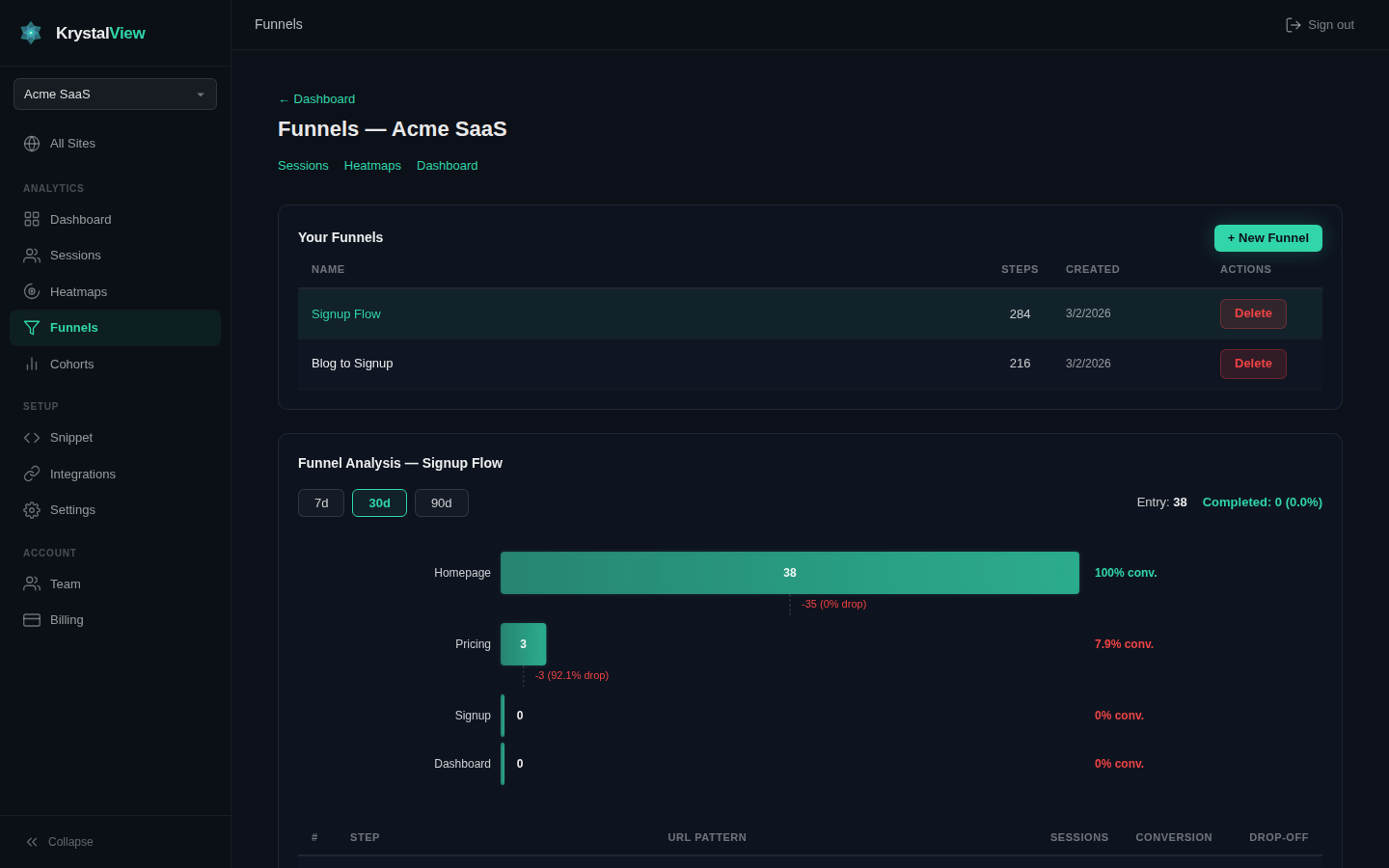
Record every click, scroll, and hesitation. Replay sessions after the fact or jump into Live View while visitors are still browsing. Overlay click and scroll heatmaps on any page. Track conversion funnels step by step.
Session Replay
Watch pixel-perfect recordings of real visitor sessions. See exactly where they clicked, scrolled, hesitated, and rage-clicked — with a timeline of every event, tagged and searchable.
Headline feature
Live View
Watch your visitors in real-time. See exactly what they see as they browse your site. Click any active session and watch their screen live with ~5 second lag. No recording delay, no waiting — just real-time visitor intelligence.
18 active now~5 second lag
Visitor 1842/pricing → /checkout
Watching liveDE • Desktop
Visitor 1764/features → /demo
Joined nowUS • Mobile
Click & Scroll Heatmaps
See where visitors click AND how far they scroll. Understand which content gets seen, where attention drops off, and which calls to action are being missed across every page.
Funnel Analytics
Build multi-step conversion funnels with contains, exact, or regex URL matching. Instantly see where visitors drop off, what the conversion rate is at each step, and how it trends over time.
Cohort Comparison
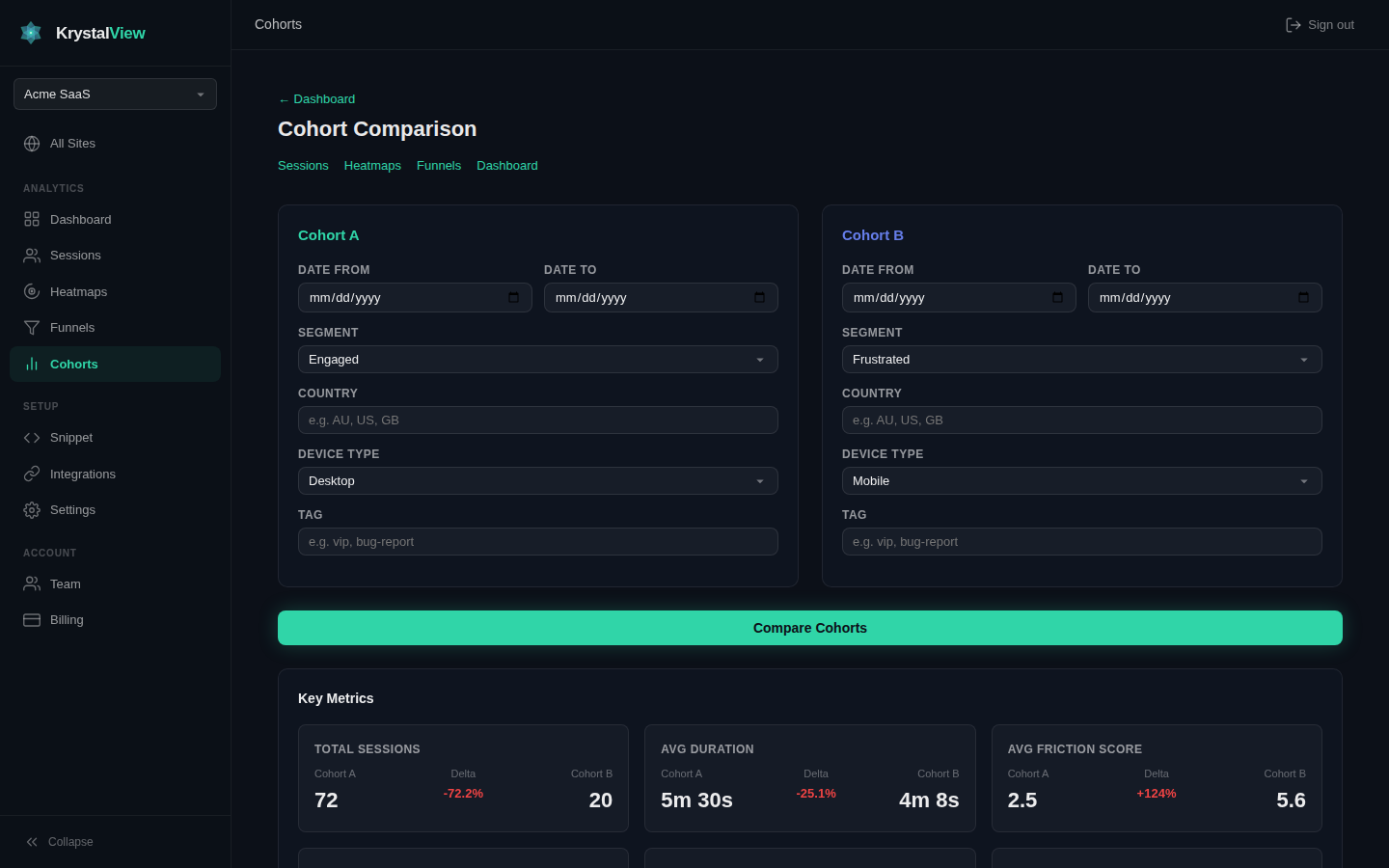
Compare any two visitor segments side by side — frustrated vs. engaged, mobile vs. desktop, new vs. returning — with SVG charts showing how each group behaves differently on your site.
AI Analytics
AI that actually understands your visitors
Most analytics tools just record. KrystalView builds an AI evidence store — every session is automatically analyzed, and all AI features draw from that evidence base. Not one-shot prompts. Real, compounding intelligence.
AI Evidence Store
This is what makes KrystalView different. Every session that comes in is automatically processed by AI to extract a structured evidence record: behavioral patterns (browsing, searching, comparing, buying), a friction score from 0 to 10, an intent guess (what the visitor was trying to accomplish), and specific UX issues (confusing navigation, broken flows, rage clicks on non-interactive elements). These evidence records accumulate over time, so when you ask a question, get a recommendation, or read a weekly insight — it’s grounded in real analyzed data, not a generic prompt.
Ask questions about your analytics in plain English — “Why is my checkout page bounce rate so high?”, “Which pages cause the most rage clicks?”, “Compare mobile vs desktop friction this week.” Simple questions get instant answers. Complex questions like “why” and “compare” automatically escalate to deeper analysis that cross-references the evidence store. You can also chat about individual sessions — select any session and ask AI what happened and why.
AI Recommendations
Get 3–5 prioritized, actionable UX recommendations on your dashboard — each one backed by evidence from real sessions, not generic best practices. Each recommendation tells you what to fix, why it matters, how severe it is (high, medium, low), and cites the specific data point that triggered it. Recommendations update automatically as new sessions come in and new patterns emerge.
Weekly AI Insights
Every week, KrystalView’s AI reviews your site’s session data and generates a digest of the most important trends, shifts, and opportunities — delivered to your dashboard and optionally to Slack. It compares this week vs. last, highlights emerging friction patterns, and calls out sessions that represent new behavior you haven’t seen before. No manual analysis required.
Anomaly Detection & Explanation
KrystalView automatically monitors your traffic patterns every hour — session counts, average duration, friction levels, error rates, and bounce rates. When something deviates significantly from your 7-day rolling average, it flags it immediately and uses AI to explain what likely caused the change, drawing on recent session evidence to support its reasoning. Alerts go to your dashboard and Slack.
Behavioral Segmentation
Every session is automatically classified into one of six behavioral segments — frustrated, engaged, exploring, bounced, converting, or casual — based on friction signals, page depth, time on site, and interaction patterns. Use these segments to filter sessions, compare cohorts, and understand which visitor types need attention. Segments appear as color-coded badges throughout the console.
Premium AI
AI Design Intelligence, backed by real visitor behavior
When KrystalView detects conversion friction, it can turn that evidence into AI-generated redesign mockups for the exact page that is leaking revenue.
Paid add-on • Credit packs from $29
AI Design Intelligence
When our AI sees paid traffic bouncing, rage clicks clustering, or mobile friction rising, it offers redesign mockups generated from your actual visitor behavior. Not generic templates. Each concept is grounded in session replay, heatmaps, bounce patterns, friction scores, and campaign performance for the page that needs help.
Behavioral data poweredRage clicks + bounce signalsProduction-ready HTMLAvailable on every plan
Design Trigger
Your paid landing page is bleeding conversions
Google Ads traffic is bouncing on /pricing, mobile visitors are rage-clicking the hero CTA, and error-heavy sessions are stalling checkout. Generate a redesign suggestion and download the HTML mockup when it is ready.
Signals Used
Campaign decayUTM and click-ID attribution show which paid traffic is dropping off.
Friction hotspotsRage clicks, cold zones, and bounce patterns tell the AI what to redesign first.
Error-awareClient-side failures are folded into the redesign brief so broken UX is not ignored.
Async deliveryWhen the redesign is ready, KrystalView alerts you in-app and can optionally email the result.
Powered by evidence, not prompts
Every redesign brief is seeded with behavioral evidence already inside KrystalView: replay timelines, heatmaps, funnel exits, campaign underperformance, and friction scores. That is why the output feels like a sharp optimization pass instead of a random AI concept.
Download mockups your team can ship
Open the finished concept in a side-by-side preview, grab the PNG for review, then download production-ready HTML mockups when you want to implement. Credit packs start at $29, so you can buy redesigns only when the data says the page needs one.
Developer & Integration Tools
REST API
Pull sessions, campaign attribution, aggregated errors, and notification events into your own tools via scoped API keys.
WordPress Plugin
Install the live KrystalView WordPress plugin by uploading the ZIP in WP Admin. The plugin injects the tracker, supports consent gating, input masking, and sampling. Download ZIP.
npm Tracker
Use the published krystalview-tracker npm package or the hosted script tag to capture sessions from custom apps without waiting for a marketplace listing.
Webhooks
Webhook notifications for error spikes, campaign anomalies, AI design-ready events, goal conversions, and weekly digests.
Slack Integration
Anomaly alerts, weekly AI digests, and goal notifications delivered directly to your Slack channel.
Embed Widgets
Drop heatmaps, session counts, or stats cards into any page with simple embed codes.
Shopify + GTM Ready
Shopify theme extension and Google Tag Manager template source are structured and ready for teams that prefer theme or tag-manager deployment. Marketplace listings are not claimed here.
Advanced Analytics
Goals & Conversions
Define URL-based conversion goals and track completion rates with trend charts over time.
Live Visitor Count
See how many visitors are on your site right now, what pages they’re viewing, and where they’re from. The real-time dashboard keeps your active session list live as traffic moves.
24 live/pricingDE • US • NL
Visitor Profiles
See an individual visitor’s full journey across multiple sessions with behavioral trends.
Campaign Intelligence
Track UTM sources, capture Google and Facebook click IDs, compare campaign conversion rates, and drill from a dashboard straight into the sessions behind every ad. Know exactly where your traffic comes from and which spend is working.
Visualize the most common navigation paths visitors take through your site.
Hourly Anomaly Alerts
Get notified when errors spike, campaigns underperform, or your AI design suggestions are ready — with an in-app bell, Slack, webhooks, and optional email delivery.
Smart Error Detection
Automatically catch JavaScript errors, broken images, failed scripts, and resource failures, then aggregate them by frequency so you can mute noise, resolve issues, and jump into the exact replay where the failure happened.
Invite team members with role-based access — admin, editor, or viewer permissions.
Privacy Controls
IP anonymization, Do-Not-Track support, GDPR mode, and configurable data retention (7–730 days).
Automated Reports
Daily, weekly, or monthly email reports with your key metrics delivered automatically.
16 Languages
Full console and landing page translation in 16 languages including RTL support for Hebrew.
~58 KB
Gzipped tracker size
Zero
Cookies used
GDPR
Privacy-first by default
All features
Included on every plan
MCP is the product interface
Not another dashboard. A context layer for agents.
Dashboards are for humans. MCP is for the tools doing the work. KrystalView gives Claude, Cursor, Windsurf, Slack workflows, and your own LLM callable access to the same visitor evidence your team sees: sessions, funnels, campaigns, errors, anomalies, and conversion paths.
The next interface is not a prettier SaaS screen. It is an AI tool asking for context. KrystalView publishes a production-grade MCP server so any agent — Claude, Cursor, Windsurf, Slack workflows, or your own LLM — can discover, query, and act on visitor evidence using standardised functions. As agents, IDEs, chat tools, and AI devices become primary interfaces, your analytics data stays natively callable rather than locked behind a proprietary UI.
Model Context Protocol
Ask your coding agent what users actually did.
“I am editing /pricing. What did real visitors struggle with, which campaign sent them, and are errors involved?” KrystalView answers with session evidence, attribution, friction, errors, notifications, and design alerts. No screenshots of charts. No guessing.
3 rage-clicked on /checkout • 2 abandoned at payment Common pattern: CTA hesitation after pricing change
$ Ask from Cursor:
> I am editing /pricing. What did real visitors struggle with?
Using get_campaign_summary + get_errors...
spring_sale_2026: conversion rate down 18% week over week
Top correlated issue: checkout bundle failed in 9 sessions from paid traffic
Using get_notifications...
design_ready: redesign suggestion for /pricing is available
Visitor truth as callable tools
Sessions, site stats, campaign summaries, error aggregates, notifications, anomalies, funnels, and funnel analysis. Your AI gets structured analytics data it can reason over, cite, and use while work is happening.
Use Claude Desktop, Claude Code, Cursor, Windsurf, Slack workflows through your own agent, or any MCP-compatible client. KrystalView is not locked to our chatbot or our model. One API key, 30-second setup, official MCP Registry listing.
Claude•Cursor•Windsurf•Slack•Any MCP client
Pricing
Transparent pricing. No feature gating.
Every plan includes every feature — AI chat, recommendations, heatmaps, funnels, team management, API access, everything. You only pay for sessions and sites.
All paid plans include a 14-day free trial. Cancel anytime. Prices in USD. AI Design Intelligence mockups are available on any plan with optional credit packs from $29.